Plans and Quotas
FluidGrids is priced on usage, not features: every plan includes the full builder, the whole node catalog, triggers, versioning, and the run history. Plans differ in how much you can create and run.
What is metered
| Quota | What it counts |
|---|---|
| Workflows | Workflows in the workspace. Creating, duplicating, and importing from a template all count. |
| Active workflows | Workflows with an Active version. |
| Runs per month | Every execution, however it was triggered. |
| Concurrent executions | Runs executing at the same moment. |
| Execution time | How long a single run may take. |
| Run history | How long runs and logs are kept. |
| Custom nodes | Node packages you register yourself. |
| AI queries | FluidGrids AI requests. |
| Sandbox runtime hours | Time spent executing store nodes in isolated sandboxes. |
Current tiers, limits, and prices are on fluidgrids.ai/pricing. Free includes everything needed to build and run real workflows on a small scale; Starter, Pro, and Enterprise raise the limits, retention, and support level. Enterprise adds SSO/SAML and OEM embedding.
Where to see your usage
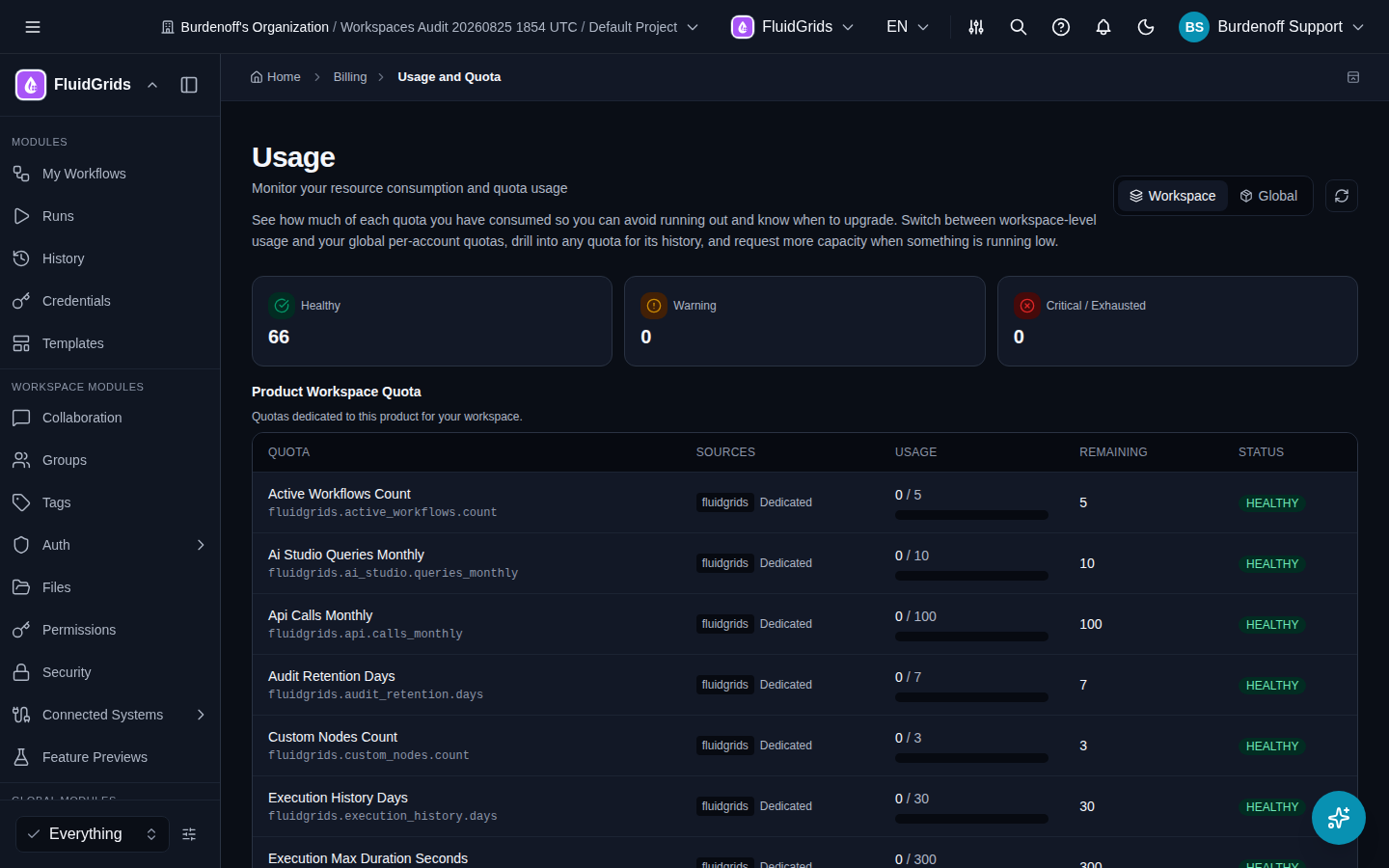
Billing › Usage and Quota in the Global Modules group shows each quota with its current usage and limit for the workspace. The Product Workspace Quota table lists the FluidGrids quotas by name — these are the names that appear in quota error messages:
| Quota name | What it limits |
|---|---|
fluidgrids.workflows.count | Workflows in the workspace |
fluidgrids.active_workflows.count | Workflows with an Active version |
fluidgrids.runs.monthly | Runs per month |
fluidgrids.execution_max_duration.seconds | How long one run may take |
fluidgrids.execution_history.days | Run and log retention |
fluidgrids.custom_nodes.count | Custom node packages |
fluidgrids.ai_studio.queries_monthly | AI assistant requests per month |
fluidgrids.api.calls_monthly | API calls per month |
fluidgrids.audit_retention.days | Audit log retention |
Switch between Workspace and Global to see workspace-level and account-level quotas. Billing › Plans shows the available plans and lets you upgrade; Billing › Addons sells extra executions, concurrency, storage, AI queries, API calls, and custom nodes without changing plan.
The messages you will see
| Message | Meaning | What to do |
|---|---|---|
| Workflow Limit Reached — You've reached the workflow limit for your plan. Upgrade your plan to create more workflows. | Creating, duplicating, or importing would exceed the workflow quota. | Delete workflows you no longer need, or click View Billing to upgrade. |
No active subscription covers fluidgrids.workflows.count (or another fluidgrids.* quota name) | The workspace has no plan assignment for that quota — typically a workspace created outside the normal sign-up path, or a plan that has lapsed. | Open Billing › Overview. If no subscription is shown, choose a plan (Free is enough to unblock). If a plan is shown and the message persists, contact support with the workspace name. |
| Workspace limit reached — upgrade your plan to create more. | The number of workspaces on the account is at the plan cap. | Upgrade or remove an unused workspace. |
| A run stays Pending | The concurrency limit is in use. | It starts when a slot frees. Raise the limit under Billing if this is routine. |
| A run ends Failed with a timeout | The run exceeded the plan's execution time. | Split the workflow into sub-workflows or reduce the work per run. |
Notifications
Quota warnings and run failures are delivered through the platform notification service (Communication › Notifications), by email and in-app, so you hear about a limit before it blocks you.